
Walking into a camera store (or scrolling through an online shop) and seeing a wall of SD cards can be overwhelming. Class 10, UHS-I, UHS-II, V30, V90… it looks like a secret code only professionals understand.
The good news? It’s simpler than it looks once you know what each label actually means. In this guide, you’ll learn what really matters when choosing an SD card, how to avoid common beginner mistakes, and how to pick the right card for your specific type of shooting — without overpaying for features you don’t need.
Why Your SD Card Choice Actually Matters
It’s tempting to think a memory card is just storage — buy the cheapest one and move on. But the wrong SD card can cause real problems during a shoot.
If a card can’t write data fast enough, you might see your camera’s buffer fill up mid-burst, forcing you to wait before you can keep shooting. For video, an underpowered card can cause recording to stop unexpectedly, or even result in corrupted footage. That’s why camera manufacturers list minimum recommended card specs in their manuals — it’s not a suggestion, it’s based on what the camera’s sensor and processor actually need to keep up.
Understanding what those specs mean is the first step to making a smart choice.
⚠️ Watch Out: Counterfeit SD cards are a real problem, especially on third-party marketplaces. A fake card might report a much higher capacity than it actually has, silently overwriting your files once it’s “full.” Always buy from authorized retailers or trusted, well-reviewed sellers.
Understanding Speed Classes (Without the Headache)
SD cards use a few different rating systems, and yes, it’s confusing that they overlap. Here’s a simplified breakdown of what you’ll actually see on the card itself:
| Rating System | What the Symbol Looks Like | What It Tells You |
|---|---|---|
| Speed Class | A number inside a “C” shape | Minimum sustained write speed (basic) |
| UHS Speed Class | A number inside a “U” shape | Minimum write speed for UHS-enabled cards |
| Video Speed Class | “V” followed by a number | Minimum sustained write speed, designed specifically for video |
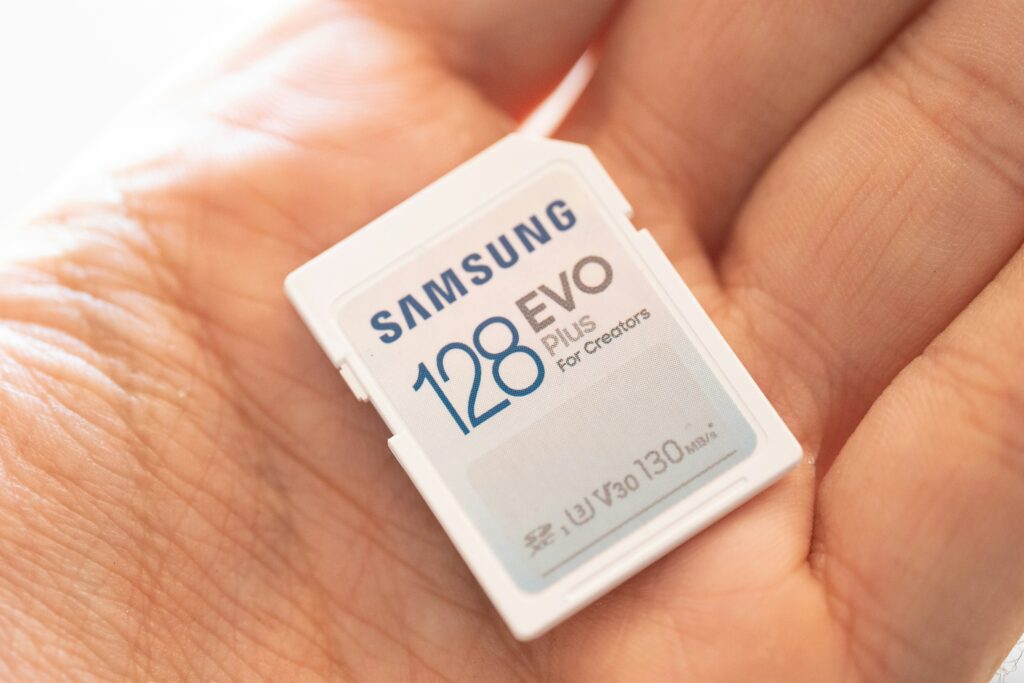
The simplest rule of thumb: for video, look at the Video Speed Class (V-rating) first — it was created specifically to guarantee consistent recording performance, which matters more than peak burst speed.
💡 Quick Tip: Don’t just look at the headline “speed” printed in big letters on the packaging (often a marketing number for read speed). Flip the card over and check the small Speed Class symbols — those reflect guaranteed minimum write speed, which is what actually matters while you’re shooting.
Storage Capacity: How Much Do You Really Need?
More storage isn’t automatically better — it depends entirely on what you’re shooting.
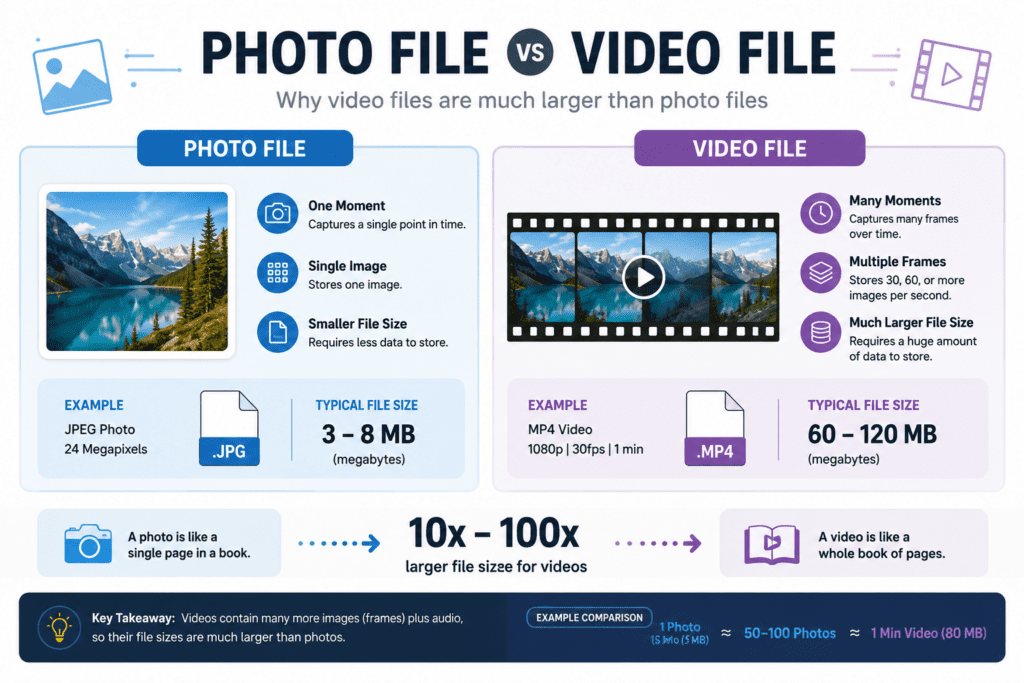
Standard JPEG photos take up relatively little space, so even a modest-capacity card can hold thousands of them. RAW photo files are significantly larger, since they preserve much more image data for editing flexibility. Video is on a different scale entirely — especially 4K or 8K footage, which can consume storage at a dramatically faster rate than photos, even for just a few minutes of clips.
A practical approach: think about how long you typically shoot between transferring files to a computer, and choose a capacity that comfortably covers that — with some buffer room left over, since you never want to stop mid-shoot because a card filled up.
📌 Key Takeaways:
- JPEGs = smallest file size, RAW = noticeably larger
- 4K/8K video uses storage far faster than photos
- Choose capacity based on your shooting session length, not just “bigger is always better”
Photography vs. Video: Different Needs, Different Cards
Photographers and videographers don’t necessarily need the same card, even if they’re shooting with similar cameras.
If you mostly shoot stills, capacity and reliability tend to matter more than chasing the highest possible speed rating — unless you’re shooting fast burst sequences of action or sports, where buffer-clearing speed becomes important too.
If you shoot video, especially in 4K or higher, sustained write speed is the priority. This is the speed the card can maintain continuously, not just in short bursts — which is exactly what Video Speed Class ratings are designed to guarantee. A card that looks great on paper but lacks a high V-rating may struggle with longer takes.
⚠️ Watch Out: Always check your camera’s manual for supported card types and speed requirements before buying. A card that’s technically “compatible” may still bottleneck your camera’s performance if it doesn’t meet the minimum recommended spec.


Common Mistakes Beginners Make When Buying SD Cards
A few avoidable mistakes come up again and again:
- Buying based on capacity alone, ignoring speed ratings entirely
- Choosing the cheapest option from an unfamiliar seller, increasing the risk of counterfeit cards
- Not checking camera compatibility — some older cameras can’t read newer card formats (like certain SDXC or UHS-II cards) at full speed, or at all
- Skipping backup storage, treating the SD card as permanent storage instead of transferring files regularly
A little research before buying saves a lot of frustration later — and protects the footage and photos you worked hard to capture.
⚠️ Watch Out: Always check your camera’s manual for supported card types and speed requirements before buying. A card that’s technically “compatible” may still bottleneck your camera’s performance if it doesn’t meet the minimum recommended spec.
Wrapping Up: Choosing the Right SD Card for You
📌 In short:
- Match the Speed Class (especially V-rating) to your shooting needs, not just the marketing speed number
- Choose capacity based on your actual shooting habits — photos vs. video make a big difference
- Buy from trusted sellers and always check your camera’s specific compatibility requirements
Choosing an SD card doesn’t need to be stressful once you know what the labels actually mean. Take a moment to think about what you mostly shoot, match that to the right speed and capacity, and you’ll have one less thing to worry about on your next shoot.
Leave a Reply